AI tattoo generator: how to get a design you'll actually ink
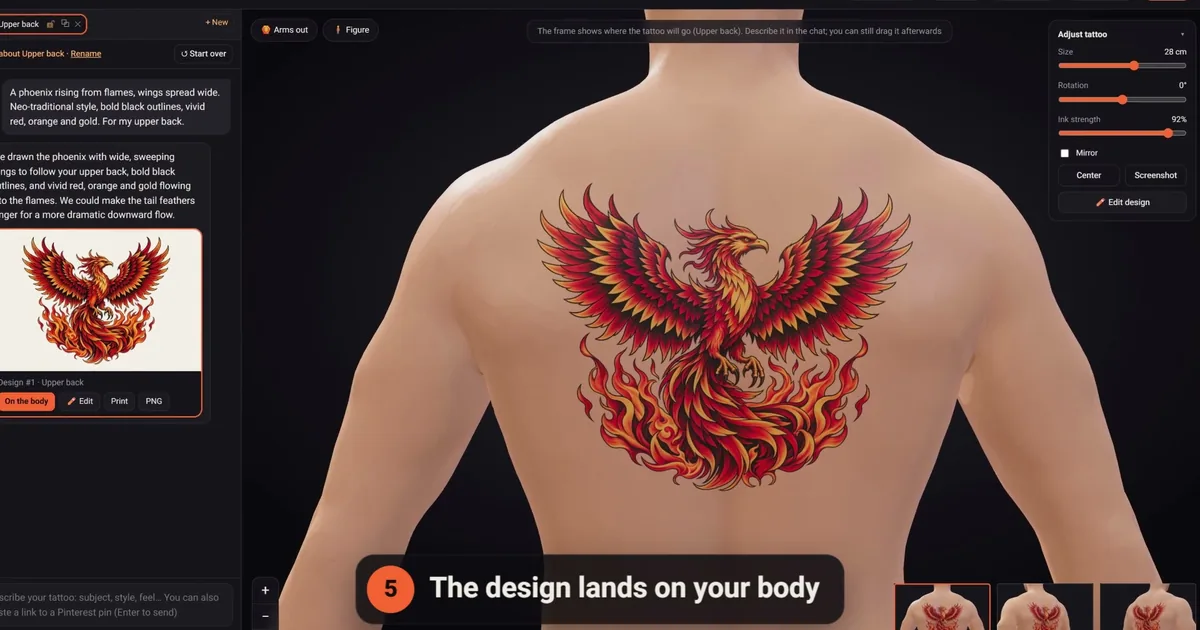
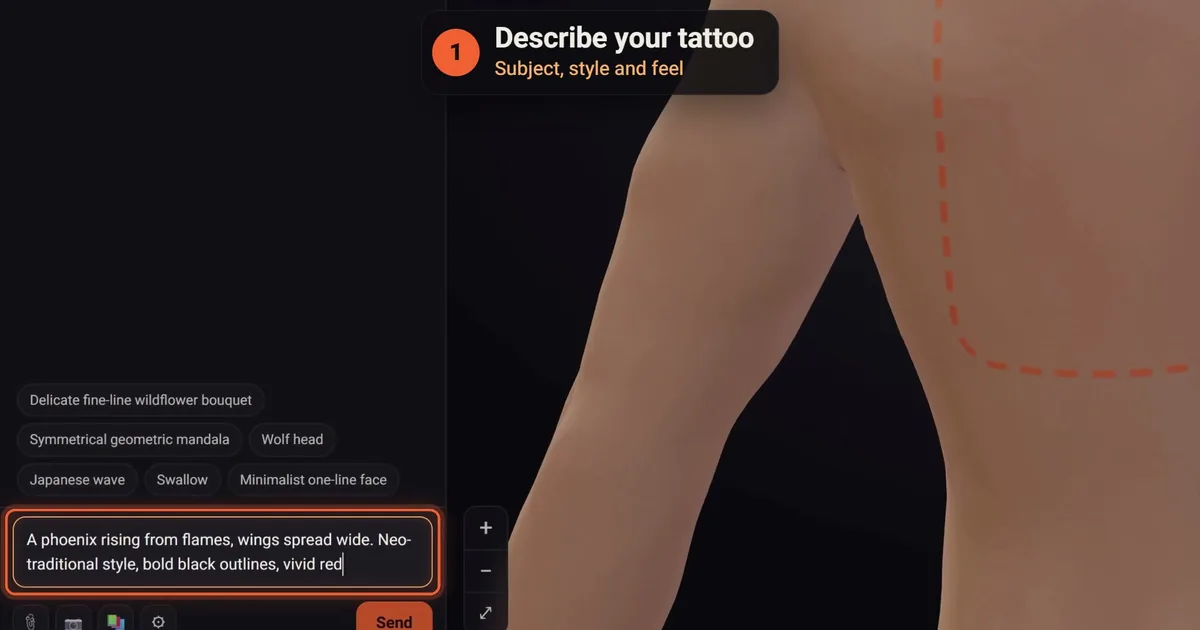
An AI tattoo generator turns a sentence like "a phoenix rising from flames, wings spread wide, across my upper back" into an original design in a minute or two. Getting a picture is the easy part. Getting a tattoo is harder: linework that holds up in skin, a shape that fits the spot, and a design you have seen on your own body before the needle ever touches it.
What an AI tattoo generator actually does
Most of these tools are built on a text-to-image model: you describe something in words and the model draws an image that matches. The same technology makes fantasy landscapes and product photos, and that is exactly the problem. Left alone, a general image model gives you soft airbrushed gradients, glowing white highlights and a painted background. It looks great on a phone screen and falls apart as a stencil.
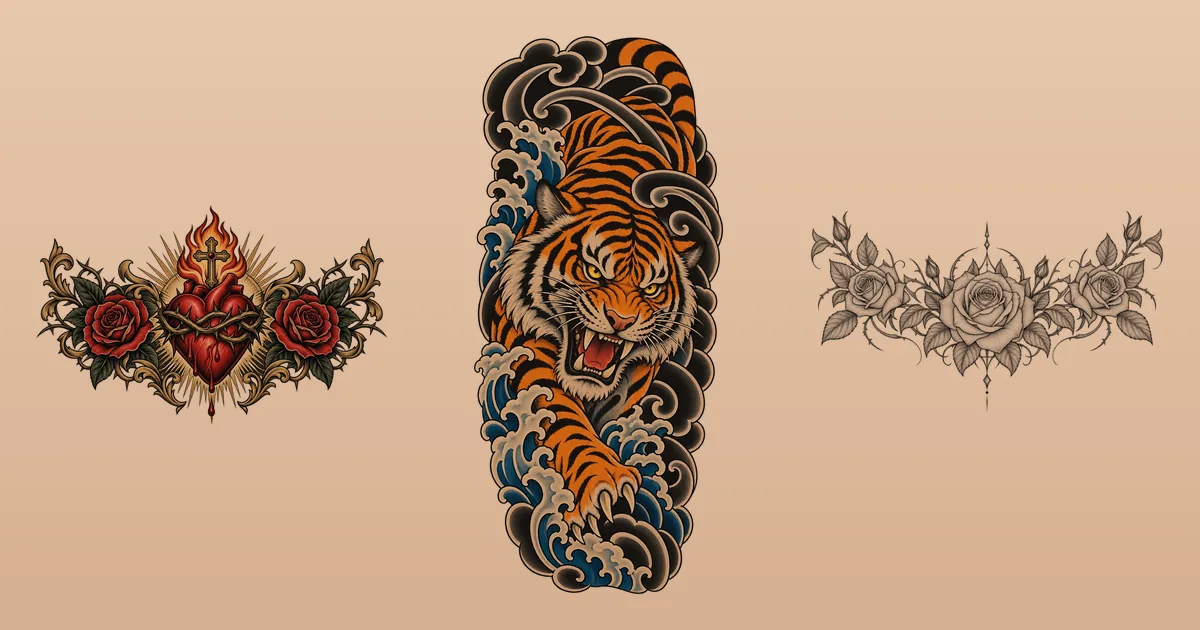
A tattoo-focused generator adds the rules a working artist follows. It keeps a strong outline, builds depth with shading rather than white paint, leaves deliberate open skin, removes the background and shapes the frame for the body part. At click2ink, designs carry no white ink unless you ask for it, because white on a design really means bare skin, and the highlights come from your skin itself.
The better tools also remember the conversation. You are not typing one perfect prompt and hoping. You talk it through: "make the wings wider," "drop the smoke," "black and grey instead of colour," and each answer builds on the last.
Picture or tattoo? Five checks for any AI design
Before you fall in love with a result, run it past the same checks a tattoo artist would:
- It reads at arm's length. Squint at it. If the silhouette turns to mush, so will the tattoo in ten years.
- The line weights vary, and none are too fine for its size. A bold outer contour, medium inner lines and finer detail lines are the classic plan.
- The shading uses the skin. Negative space and smooth grey or stippled shading age well; white highlights don't.
- The detail matches the size. A 6 cm piece on the ankle needs fewer, bolder elements than a 28 cm back piece.
- The shape fits the placement. Tall and narrow for the forearm, calf and ribs; wide for the chest and lower back; balanced for the shoulder and hand.
How to use an AI tattoo generator, step by step
The order matters more than people expect. Start from the body and the style, and the description gets easier.
1. Decide where it goes
Placement sets the shape and the size, and size sets how much detail survives. A sleeve is a different project from a chest piece. If you are unsure, our guide to tattoo placement walks through the trade-offs of each spot.
2. Pick a style
"Fine line," "Japanese," "American traditional" and "blackwork" each come with their own line weights and shading. Naming one gives the AI a whole set of rules at once. If you can't decide, browse the tattoo styles guide, or let the artist choose and see what comes back.
3. Describe the subject, the composition and the feel
Say what is in it, how it is arranged and what mood you want. Concrete beats clever:
| Vague | Clear |
|---|---|
| a wolf tattoo | a wolf head in three-quarter view, black and grey, soft whip shading, a full moon behind it, tall for the outer forearm |
| flowers | a single peony with two leaves, fine line, almost no shading, small, for the ankle |
| something meaningful | a compass with my daughter's birth date in small roman numerals under it, clean geometric lines |
For more examples, our collection of AI tattoo prompts breaks down what to write for each style.
4. Add a picture if you have one
A screenshot, a sketch on paper or a photo of a tattoo you saw on someone's arm all help. Say what to take from it: the idea, the style, or that exact design. A good generator can lift a tattoo off the skin in a photo and redraw it as clean artwork; see turning a photo into a tattoo design.
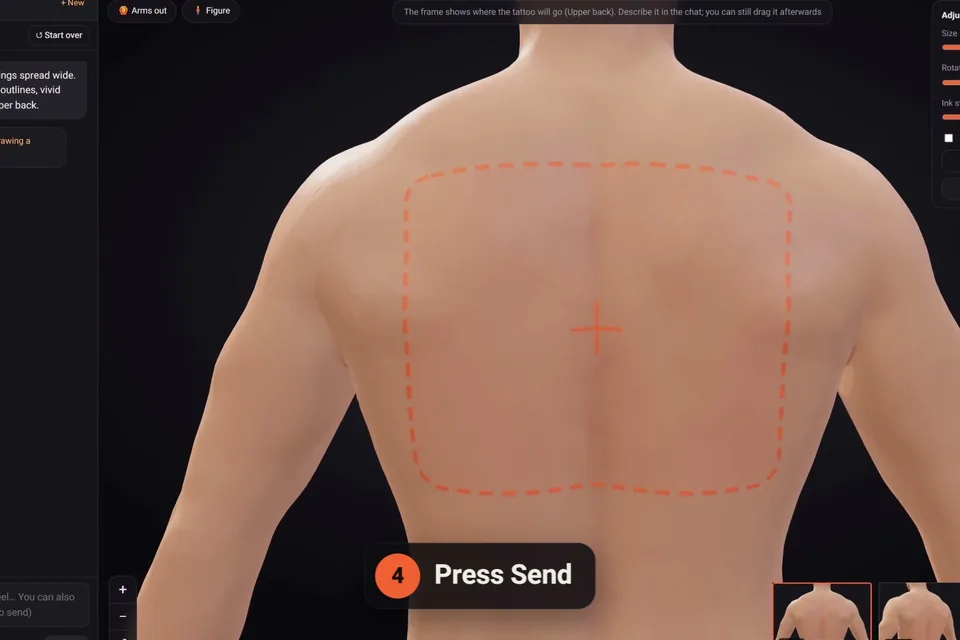
5. Refine one change at a time
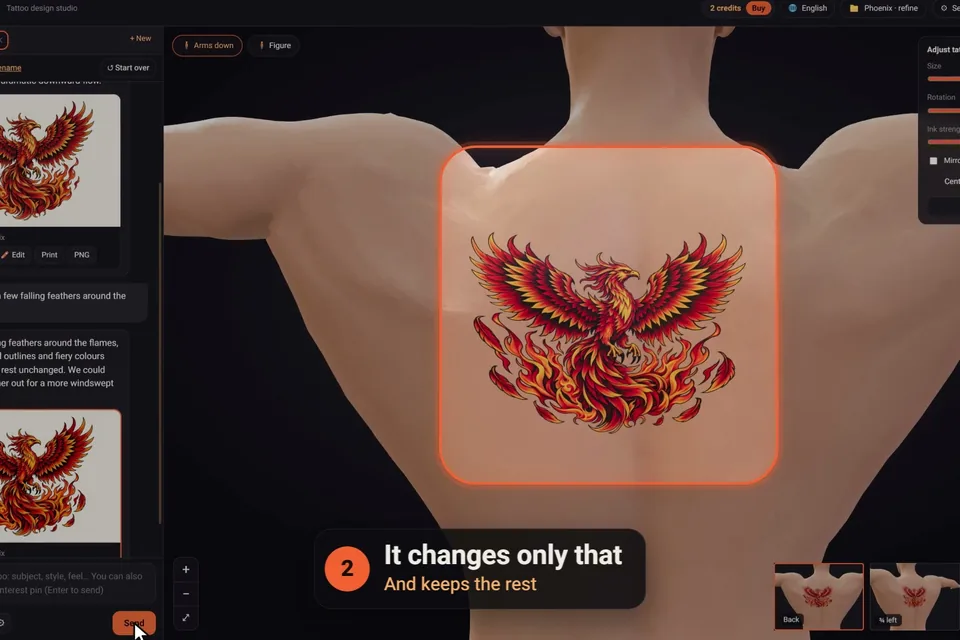
Ask for one or two specific changes per message, and say where: "make the petals deep red," "remove the three small stars on the left." In the click2ink studio the AI changes only what you asked and keeps the rest exactly as it was, and every version keeps its number, so going back to Design #2 is one click.
See it on your body before you decide
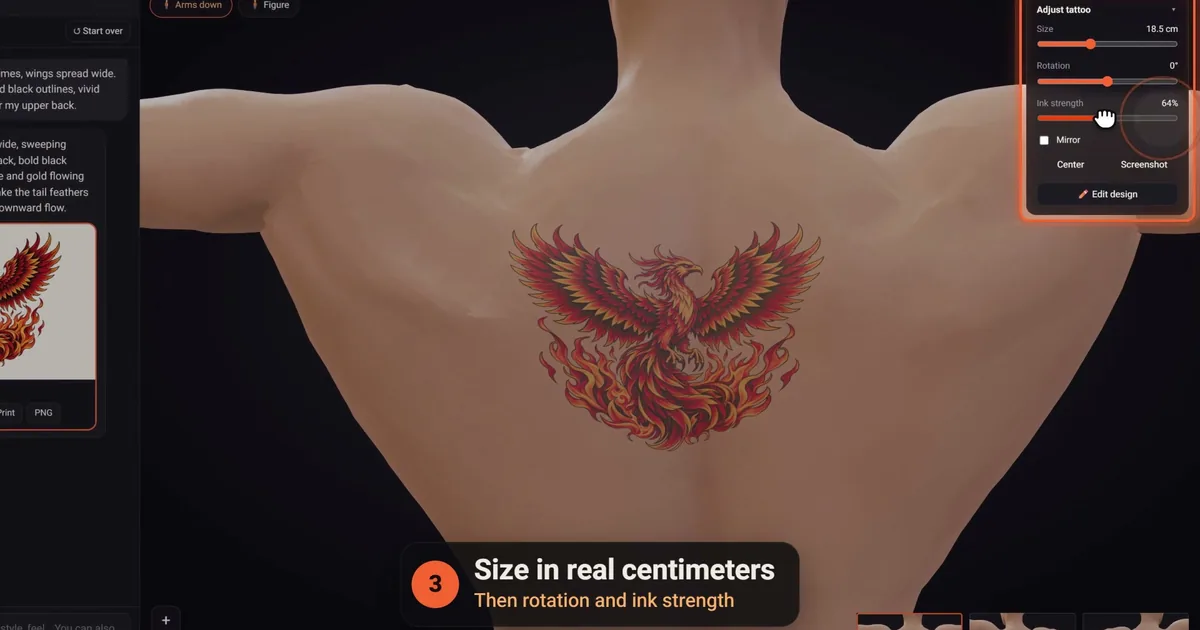
A flat design on a white screen hides the most important question: how it sits on you. A forearm piece that looks balanced on paper can wrap halfway out of sight; a chest piece can sit too low once it follows the curve of the pecs.
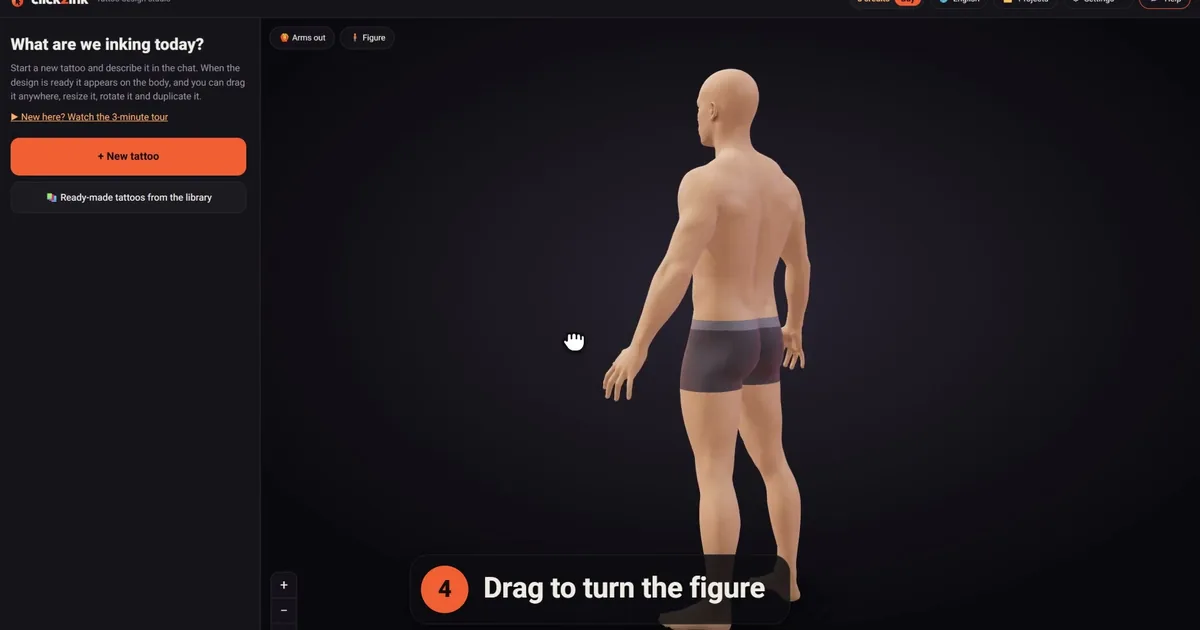
That is why we built click2ink around a 3D figure rather than a gallery. The design lands on the body in your skin tone, sized in real centimetres to your height, and you turn the figure, raise its arms and drag the tattoo until it's right. Sleeves wrap all the way around the limb, the way ink really does. Our tattoo simulator guide covers what to check from each angle, and how it works shows the whole flow in pictures.
Where the AI stops and your tattoo artist takes over
An AI tattoo generator is brilliant at exploring ideas and terrible at knowing your skin. Treat the result as the clearest brief you have ever given an artist, not as the final stencil. A tattoo artist will adjust line weights for your skin, rework details that won't age well and fit the drawing to your body on the day.
Bring three things: the design as a PNG, a print of the stencil at the size you chose, and a link that shows it on the figure. Many artists like working from a clear reference; some prefer to draw from scratch. Ask, and respect the answer. We wrote a whole piece on AI tattoo designs and tattoo artists if you want the details.
What an AI tattoo generator costs
Prices vary widely, from free tools with watermarks or public galleries to monthly subscriptions. At click2ink you sign in with Google and start with 3 free credits, no card. A credit is one message to the AI artist: a new design or a change. After that you buy a pack once, from $5 for 10 credits, and the credits never expire. Browsing the 450+ ready-made designs in the library, moving tattoos on the body, printing and sharing are always free. The details are on the pricing page, and our look at free AI tattoo generators compares what "free" usually means.
What no generator can decide for you
Pain, healing, allergies and ink safety are questions for your tattoo artist and, if you have a skin condition, your doctor. Inks are regulated differently from country to country; the U.S. FDA keeps a plain-language page on tattoos, temporary tattoos and permanent makeup that is worth reading before any first tattoo. The design is the part you can sort out calmly, from your sofa, as many times as you like.
AI tattoo generator: common questions
Is there a free AI tattoo generator?
Yes, several tools have a free tier, usually with limits: a few designs a day, watermarks, low resolution or designs shown in a public gallery. click2ink gives every new account 3 free credits, each one a full message to the AI artist, and the library of 450+ ready-made designs is free with no limit. Check what a tool keeps public before you describe anything personal.
Are AI tattoo designs original?
A good generator draws each design from scratch for your request rather than pulling an existing tattoo from a database. That said, the AI learns from huge amounts of imagery, so very common subjects can look familiar. Specific details, such as your own symbols, placement and combination of elements, are what make a design truly yours.
Can an AI tattoo generator work from my photo?
Many can use a photo as inspiration. Some go further: attach a photo of a tattoo on someone's skin and the AI lifts the design off the skin as clean artwork, which you can then change. In click2ink you choose whether the picture is the idea, the style or the exact tattoo you want.
Will my tattoo artist accept an AI design?
Many artists are happy to work from a clear reference, and an AI design is exactly that. Expect them to redraw it for your skin and size, and to suggest changes. A few artists only tattoo their own drawings; ask when you book, and bring the design as a starting point rather than a demand.
How do I write a good AI tattoo prompt?
Name the subject, the style, the placement and the mood, in that order, and add details that matter to you. "A swallow in flight, American traditional, bold outlines, red and green, for the chest" beats "a bird tattoo" every time. Then refine with one specific change per message.
Can I see the AI tattoo on my body before getting it?
With click2ink you can: every design lands on a 3D figure in your skin tone, sized in real centimetres. You can make the figure like you, with your height, build and even your face from a photo that stays on your device, then turn it and move the tattoo anywhere.
Can an AI tattoo generator design a full sleeve?
Yes. Ask for one continuous design around the whole arm or leg, with two or three main subjects joined by a flowing background. In click2ink a sleeve wraps all the way around the limb in 3D, and you can shorten it, turn it around the arm or let it flow onto the chest.
Can the design include a name or a date?
Yes. Give the exact text and the lettering style you want, such as fine script or bold blackletter. You can also add a name or a date by hand in the design editor afterwards, which costs no credit, and check the spelling before anything is printed.
What file should I bring to my tattoo artist?
A high-resolution PNG of the design, a printed stencil at the size you chose on the body (with a check ruler so the print can be verified), and a share link to the 3D figure so your artist sees the placement. That combination answers most of an artist's questions before the first appointment.