Tattoo generator from photo: turning a picture you love into a tattoo you'll wear
Maybe it's your dog asleep on the sofa, a page of your grandmother's handwriting, or a blurry phone shot of a stranger's forearm piece you keep thinking about. A tattoo generator from photo turns a picture like that into clean tattoo artwork. How good the result is depends on three things: the kind of tool, the photo you choose, and what you ask it to take from it.
Idea, style or exact copy: say what the photo is for
A photo can mean three different things, and plenty of disappointing results come from a tool guessing the wrong one.
- The idea. "This is my cat. Draw her curled up asleep as a small fine line piece." The subject comes from the photo; everything else is new.
- The style. "Use the heavy black shading and etched texture of this picture for a stag head." The look comes from the photo; the subject comes from your words.
- The exact design. "Redraw the tattoo in this photo as clean artwork." Here the tool should change as little as possible.
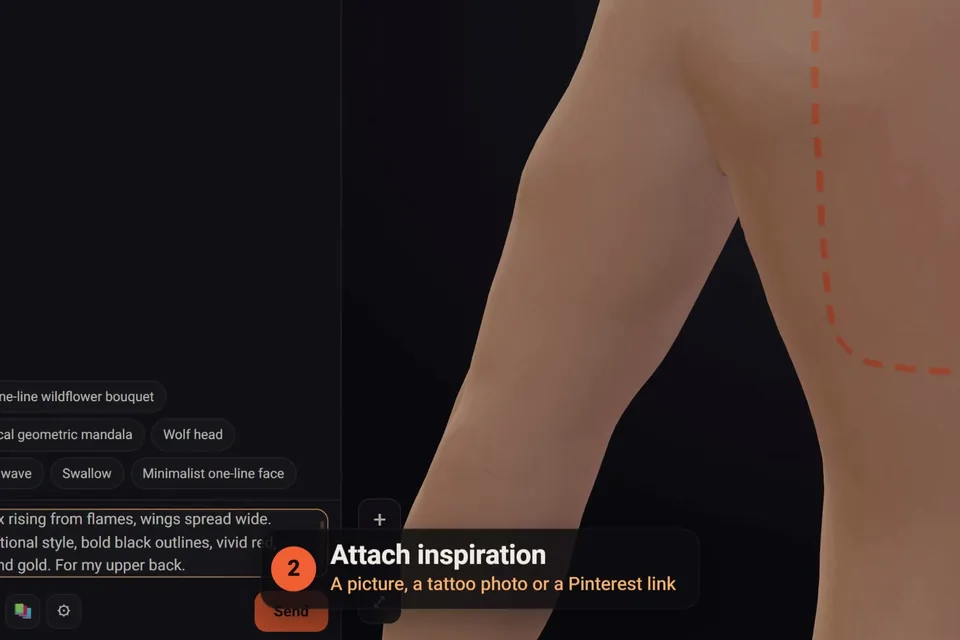
In the click2ink studio, the first tattoo of a project asks this directly: you can attach up to three pictures and choose whether the AI takes the idea, the style, or that exact tattoo. Later in the chat, the 📎 button attaches more, and a Pinterest pin link works too.
Tracing or redrawing: inside a tattoo generator from photo
Two very different machines sit behind the same promise.
Tracers work much like edge detection: they find the places where the brightness of the image changes sharply and turn them into lines. That's fast and faithful to the photo, but a tracer can't tell a whisker from a shadow. Hard light across a cheek becomes a line on the face, and a busy background becomes a tangle of marks you'll spend ages erasing.
Redrawing tools use an AI model to understand what's in the photo and draw it again as a tattoo: which lines matter, how heavy each should be, where shading goes and what to leave out. The result is less literal and far cleaner. The trade-off is likeness. A redraw of your dog is a drawing of a dog that looks like yours, and it may take a change or two to get the ears or the markings right.
For a bold outline of a simple, high-contrast image, a tracer does the job. For anything with a face, fur, fabric or soft light, you want a redraw.
Choosing the photo
The same tattoo generator from photo can give you a crisp design or a muddle, depending on the picture. Before you upload, check that it has:
- sharp focus where it counts, above all on the eyes of a person or an animal;
- soft, even light, because hard shadows get drawn as shapes;
- the subject filling the frame, with everything else cropped away;
- a straight-on angle at the subject's eye level, unless the angle is the point;
- no filters, stickers or heavy beauty smoothing.
For a tattoo on skin, shoot it flat-on in daylight, without glare, and get the whole piece in, even the parts that curve away. For handwriting or a child's drawing, lay the paper flat and shoot from directly above, or scan it. And several photos beat one: if the best picture of your dog hides an ear, attach a second that shows it and say what each one is for.
Pets, faces, places and handwriting
Different photos suit different tattoo styles, and some need more room on the body than people expect:
| The photo | Styles that suit it | Size and placement |
|---|---|---|
| A pet | Fine line outline, black and grey realism, illustrative etching | Realism needs room, such as the upper arm, thigh or calf; an outline can go small |
| A person's face | Black and grey realism, or a single-line portrait | Likeness needs size and a specialist; a line portrait can be small |
| A place or skyline | Fine line, blackwork, a geometric frame | Long and narrow for the forearm, wide for the collarbone or upper back |
| Flowers you were given | Fine line, illustrative etching, color realism | A garland across the collarbone, a single stem down the forearm |
| Handwriting or a drawing | Exactly as it is | Close to the original size, on the inner arm, wrist or ribs |
For a realistic face, read our guide to realism tattoos before you choose a size. For handwriting or a drawing, you often want no redraw at all: in click2ink your own picture can go on the body exactly as it is, with its background removed, so a parent's signature stays theirs, every wobble included.
Lifting a tattoo off the skin
A photo of a tattoo is the hardest kind of source. The skin curves, the light catches the ink, and healed lines have softened. A good tool lifts the design off the skin and redraws it flat, as clean artwork you can then change; that's what the AI does when you attach such a photo in our studio and ask for that exact tattoo. It opens up some of the best uses of a photo:
- reworking or extending a tattoo you already have;
- planning a cover-up with the old piece in front of you (our tattoo cover-up guide explains what can hide what);
- a memorial piece based on a parent's or grandparent's tattoo;
- a matching tattoo with a friend, refitted to your own arm.
A stranger's custom tattoo is a different matter. The design is someone's artwork, often made for that one person, and in the United States original artwork such as an illustration or a photograph is protected by copyright automatically once it's created. Take the idea, then change the subject, composition or style until the piece is yours, or ask the artist who made it; they may draw you something in the same spirit. Our guide to custom tattoo design covers working with an artist from the start.
From the photo to your body
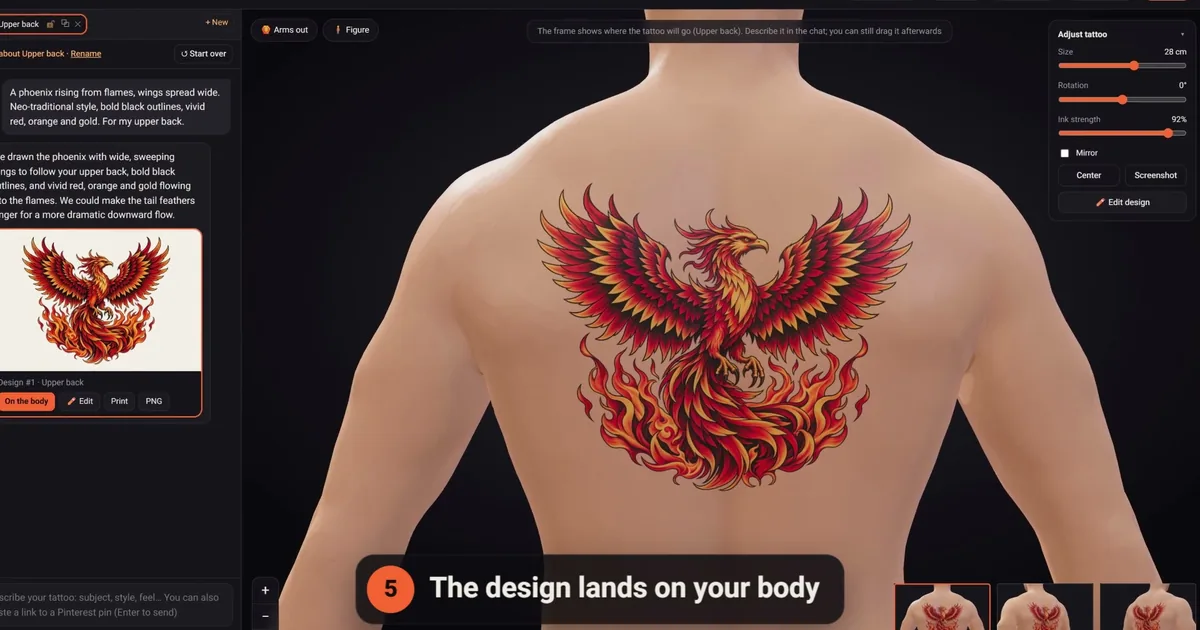
A tattoo generator from photo gives you the artwork; the next step is seeing it where it will live. In click2ink it lands on a 3D figure in your skin tone, sized in real centimeters to your height, and you can turn the figure, zoom in and move, resize or rotate the tattoo. If the pet came out facing the wrong way for your forearm, the editor flips it without spending a credit. When it's right, print it at true size with a 5 cm check ruler, or download a PNG for your artist. The features page shows each of these tools.
New to designing with AI? Our AI tattoo generator guide walks through the whole process, with or without a photo.
Questions about turning photos into tattoos
Can I turn a photo of my pet into a tattoo?
Yes. Pick a sharp photo taken at your pet's eye level, with the eyes in focus and soft light. Decide the style before you upload: a fine line outline can be small, while black and grey realism needs room to keep the fur and the expression. Mention the markings that matter, such as a white blaze or one folded ear, so they survive the redraw.
Will a tattoo generator from photo keep a face recognizable?
It gets the overall look, but small things like the shape of the eyes or a crooked smile can drift in a redraw. Ask for targeted changes ("make her eyes rounder, keep everything else") rather than starting over. For a realistic portrait, bring both the AI design and the original photo to an artist who specializes in portraits.
Can AI copy a tattoo from a picture exactly?
It can come close. Curved skin, glare and healed, softened lines mean the AI has to interpret some details, so compare the clean version with the photo line by line before you treat it as final. A sharp, flat-on photo in daylight gives the most faithful result, and you can ask for corrections one detail at a time.
Can I use a group photo and keep just one person or pet?
Yes. Crop the photo around that subject first, so the AI sees as little of everything else as possible, then say exactly what to draw and what to leave out: "only the dog, not the person holding her." If the subject is small in the frame, look for a closer photo as well; a face only a few pixels wide can't carry a likeness.
Can I use a picture I found on Pinterest?
As inspiration, yes, and our studio accepts a Pinterest pin link directly in the chat. Remember that the picture belongs to whoever made it, so use it for the idea or the style rather than as an exact copy, unless it's your own work or the artist has offered it for others to use.
Can my child's drawing go on my body exactly as it is?
Yes. In click2ink your own picture can go on the body exactly as it is, with the background removed, so every crooked line stays your child's. Photograph or scan the drawing flat, in even light. Then try it at a few sizes on the figure, including one close to the size it was drawn, and pick the one that still feels like your child's hand.
Can I use more than one photo for the same tattoo?
Yes. The first tattoo in a click2ink project accepts up to three pictures, and your description explains how they fit together, for example "my dog from the first photo, sitting under the oak tree from the second, fine line, for the calf." Keep it to one clear main subject, and let the rest support it.
Does the photo need to be high resolution?
Sharpness matters more than pixel count. A focused phone photo in good light is plenty; a blurry picture blown up to a big file is not. Avoid screenshots of screenshots and heavily compressed images from chat apps, where fine details such as fur or handwriting break up into blocks. If you only have a poor photo, describe what it can't show.
What happens to the photos I upload?
That depends on the tool, so read its privacy page. In click2ink, a picture you attach in the chat goes to the AI artist with your message, and your projects, with their tattoos, placements and chats, are kept in your account. The face photo that makes the 3D figure look like you is separate: it never leaves your device.